rwkv_lightning 批量推理教程
基于 Albatross 和 Robyn 的 RWKV 批量推理后端,具备原生的批量推理能力,同时设计了多种一键调用的批量推理 API 调用方式。
实测在单卡 5090 上以 320 路并发可以达到 10000+token/s。
安装依赖
pip install torch torchvision --index-url [https://download.pytorch.org/whl/cu130](https://download.pytorch.org/whl/cu130)
pip install robyn pydantic ninja numpy
[可选] pip install flashinfer-python
Flashinfer-python 目前尚未官方移植到 AMD ROCm,请等待官方兼容。我们实际尝试过移植它,但 Flash Infer 库有点抽象且庞大。本项目使用了基于 Pytorch 的 top_k top_p 解码来实现 Flash infer CUDA GPU 解码内核。
pip install torch torchvision --index-url [https://download.pytorch.org/whl/rocm6.4](https://download.pytorch.org/whl/rocm6.4)
pip install robyn pydantic ninja numpy
启动应用
如果不需要密码,可以不添加 --password 标志。
python app.py --model-path <your model path> --port <your port number> --password rwkv7_7.2bpython app.py --model-path <your model path> --port <your port number> --password rwkv7_7.2b --pp-devices [0,1,2,3] 如果出现图示输出,则说明启动成功。
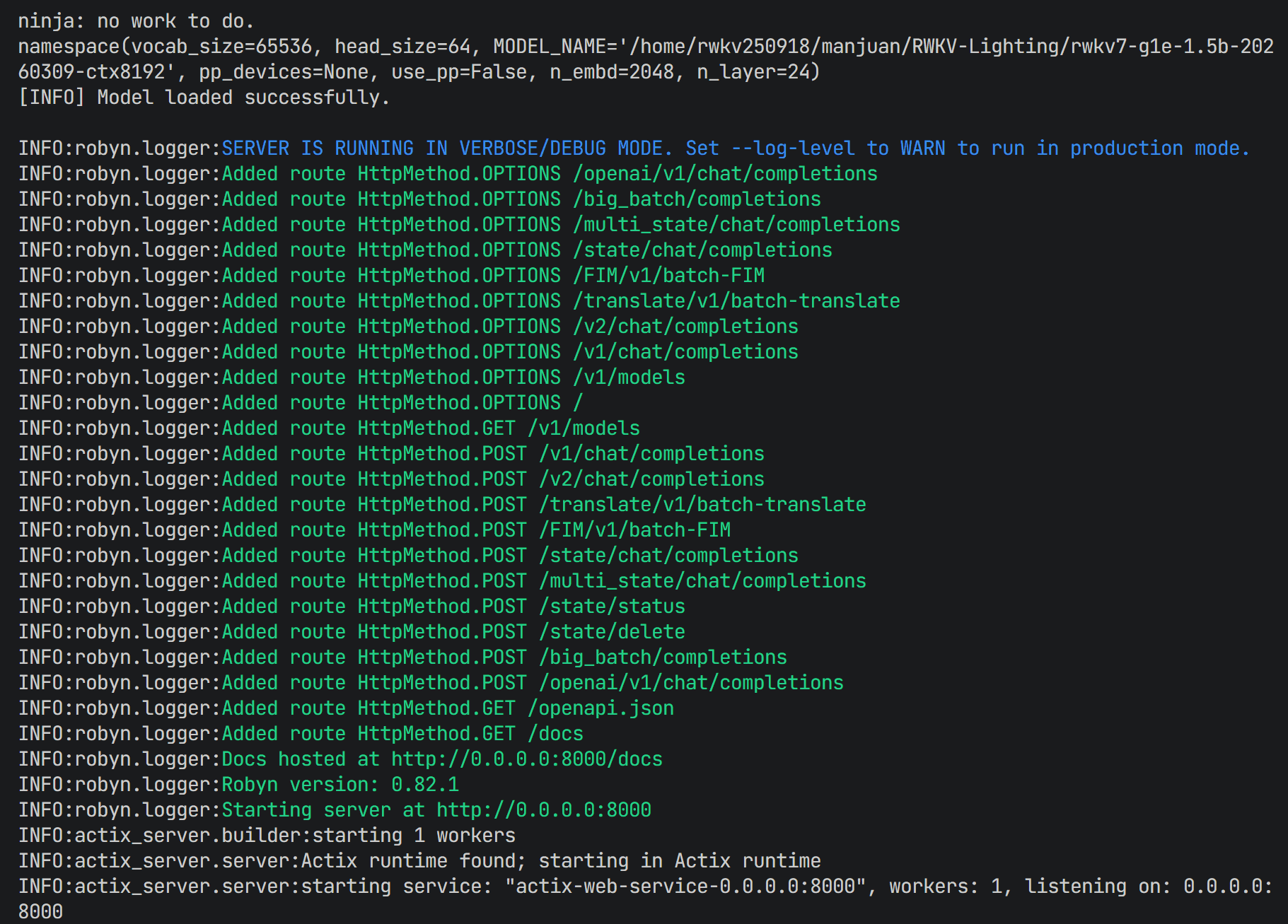
启动后,可以使用以下指令测试。
bash ./test/test_curl.sh性能优化提示
如果想获得最大程度的性能优化,可以使用 torch.compile(mode='max-autotune-no-cudagraphs')。
因为需要先编译 Triton 内核,首次推理请求时会很慢。
可以修改 rwkv_batch/rwkv7.py 第 30、31 行的代码来实现该优化:
MyFunction = torch.compile(mode='max-autotune-no-cudagraphs')
MyStatic = torch.compile(mode='max-autotune-no-cudagraphs')
关于 BatchSize == 1 使用 CUDA graph 的参数建议:
- 用于文本生成时,请确保:
"temperature": 0.8,"top_k": 1,"top_p": 0,"alpha_presence": 0,"alpha_frequency": 0,"alpha_decay": 0.96 - 用于写代码时,请确保:
"temperature": 0.5,"top_k": 100,"top_p": 0.5,"alpha_presence": 1.0,"alpha_frequency": 0.1,"alpha_decay": 0.99
API 文档
rwkv_lightning 高并发推理库支持多种 API 调用格式,下面我们将给出调用端点和对应的解释。
1. v1/chat/completions
使用 Rapid-Sampling,支持所有解码参数。
对于 V1 端点的调用方法,解码参数功能和使用其他工具调用 RWKV 系列模型时一致;
进行批量推理时,要使用相同的批量推理输入,格式如下面的 contents 所示,使用 "" 包裹单条数据,数据间使用 , 分隔。
最终会得到如下格式的输出:
data: {"object": "chat.completion.chunk", "choices": [{"index": 0, "delta": {"content": "输出内容"}}]}其中 index 为当前回复对应的条数(从 0 开始),content 为输出的具体内容。
curl -X POST http://localhost:8000/v1/chat/completions \
  -H "Content-Type: application/json" \
  -d '{
    "contents": [
      "English: After a blissful two weeks, Jane encounters Rochester in the gardens. He invites her to walk with him, and Jane, caught off guard, accepts. Rochester confides that he has finally decided to marry Blanche Ingram and tells Jane that he knows of an available governess position in Ireland that she could take.\n\nChinese:",
      "English: That night, a bolt of lightning splits the same chestnut tree under which Rochester and Jane had been sitting that evening.\n\nChinese:"
    ],
    "max_tokens": 1024,
    "stop_tokens": [0, 261, 24281],
    "temperature": 0.8,
    "top_k": 50,
    "top_p": 0.6,
    "alpha_presence": 1.0,
    "alpha_frequency": 0.1,
    "alpha_decay": 0.99,
    "stream": true,
    "password": "rwkv7_7.2b"
  }'
curl -X POST http://localhost:8000/v1/chat/completions \
-H "Content-Type: application/json" \
-d '{
"contents": [
"English: After a blissful two weeks, Jane encounters Rochester in the gardens. He invites her to walk with him, and Jane, caught off guard, accepts. Rochester confides that he has finally decided to marry Blanche Ingram and tells Jane that he knows of an available governess position in Ireland that she could take.\n\nChinese:",
"English: That night, a bolt of lightning splits the same chestnut tree under which Rochester and Jane had been sitting that evening.\n\nChinese:"
],
"max_tokens": 1024,
"stop_tokens": [0, 261, 24281],
"temperature": 0.8,
"top_k": 50,
"top_p": 0.6,
"alpha_presence": 1.0,
"alpha_frequency": 0.1,
"alpha_decay": 0.99,
"stream": false,
"password": "rwkv7_7.2b"
}'2. v2/chat/completions
使用 FlashInfer Sampling,支持所有解码参数。
和 V1 基本一致,使用的 Sampling 方法不同,在不同设备上时存在性能差异。
curl -X POST http://localhost:8000/v2/chat/completions \
  -H "Content-Type: application/json" \
  -N \
  -d '{
    "contents": [
      "English: After a blissful two weeks, Jane encounters Rochester in the gardens. He invites her to walk with him, and Jane, caught off guard, accepts. Rochester confides that he has finally decided to marry Blanche Ingram and tells Jane that he knows of an available governess position in Ireland that she could take.\n\nChinese:",
      "English: That night, a bolt of lightning splits the same chestnut tree under which Rochester and Jane had been sitting that evening.\n\nChinese:"
    ],
    "max_tokens": 1024,
    "stop_tokens": [0, 261, 24281],
    "temperature": 1.0,
    "top_k": 1,
    "top_p": 0.3,
    "pad_zero": true,
    "alpha_presence": 0.8,
    "alpha_frequency": 0.8,
    "alpha_decay": 0.996,
    "chunk_size": 128,
    "stream": true,
    "password": "rwkv7_7.2b"
  }'
curl -X POST http://localhost:8000/v2/chat/completions \
-H "Content-Type: application/json" \
-d '{
"contents": [
"English: After a blissful two weeks, Jane encounters Rochester in the gardens. He invites her to walk with him, and Jane, caught off guard, accepts. Rochester confides that he has finally decided to marry Blanche Ingram and tells Jane that he knows of an available governess position in Ireland that she could take.\n\nChinese:",
"English: That night, a bolt of lightning splits the same chestnut tree under which Rochester and Jane had been sitting that evening.\n\nChinese:"
],
"max_tokens": 1024,
"stop_tokens": [0, 261, 24281],
"temperature": 1.0,
"top_k": 1,
"top_p": 0.3,
"pad_zero": true,
"alpha_presence": 0.8,
"alpha_frequency": 0.8,
"alpha_decay": 0.996,
"chunk_size": 32,
"stream": false,
"password": "rwkv7_7.2b"
}'3. /big_batch/completions
最快的批处理 API,输入输出格式和 V1 基本一致。
仅支持 noise 和 temperature 解码参数。
curl -X POST 'http://localhost:8000/big_batch/completions' \
  --header 'Content-Type: application/json' \
  --data '{
    "contents": [
      "English: That night, a bolt of lightning splits the same chestnut tree under which Rochester and Jane had been sitting that evening.\n\nChinese:",
      "English: That night, a bolt of lightning splits the same chestnut tree under which Rochester and Jane had been sitting that evening.\n\nChinese:"
    ],
    "max_tokens": 1024,
    "stop_tokens": [0, 261, 24281],
    "temperature": 1.0,
    "chunk_size": 8,
    "stream": true,
    "password": "rwkv7_7.2b"
  }'
4. /openai/v1/chat/completions
支持 Open AI 格式。
相关专项测试脚本:
python test/test_openai_adapter.py
python test/test_openai_routes.pycurl -X POST 'http://localhost:8000/openai/v1/chat/completions' \
--header 'Content-Type: application/json' \
--header 'Authorization: Bearer your-password-if-set' \
--data '{
"model": "rwkv7",
"messages": [
{"role": "user", "content": "please tell me about the history of artificial intelligence"}
],
"top_p": 0.6,
"max_tokens": 2048,
"temperature": 0.8,
"stream": true
}'curl -X POST 'http://localhost:8000/openai/v1/chat/completions' \
--header 'Content-Type: application/json' \
--header 'Authorization: Bearer your-password-if-set' \
--data '{
"model": "rwkv7",
"messages": [
{"role": "system", "content": "You are a helpful assistant."},
{"role": "user", "content": "please tell me about the history of artificial intelligence"}
],
"top_p": 0.6,
"max_tokens": 2048,
"temperature": 1,
"stream": false
}'带有 session_id 的有状态增量 Open AI API:
curl -X POST 'http://localhost:8000/openai/v1/chat/completions' \
  --header 'Content-Type: application/json' \
  --header 'Authorization: Bearer your-password-if-set' \
  --data '{
    "model": "rwkv7",
    "messages": [
      {"role": "system", "content": "You are a helpful assistant."},
      {"role": "user", "content": "Please continue from our last turn and give me 3 short ideas."}
    ],
    "top_p": 0.6,
    "max_tokens": 2048,
    "temperature": 1,
    "stream": false
  }'
5. 批量同步翻译
兼容沉浸式翻译自定义 API。
curl -X POST http://localhost:8000/translate/v1/batch-translate \
         -H "Content-Type: application/json" \
         -d '{
           "source_lang": "en",
           "target_lang": "zh-CN",
           "text_list": ["Hello world!", "Good morning"]
         }'
curl -X POST http://localhost:8000/translate/v1/batch-translate \
-H "Content-Type: application/json" \
-d '{
"source_lang": "zh-CN",
"target_lang": "en",
"text_list": ["你好世界", "早上好"]
}'6. state/chat/completions
单条输入和回复专用端点,进行了推理速度上的优化。
支持状态缓存管理器,设计了 3 级缓存设计:
- L1 缓存 (显存) 16
- L2 缓存 (内存) 32
- L3 缓存 (Sqlite3 数据库)
关闭服务器时,所有缓存的状态都将存储在数据库中。可以在 ./state_pool.py 的第 14-16 行修改缓存大小。
注意:
- 需要在请求体中添加唯一的
"session_id": "XXX"作为每个会话的唯一标识符
curl -X POST http://localhost:8000/state/chat/completions \
  -H "Content-Type: application/json" \
  -N \
  -d '{
    "contents": [
      "User: What should we eat for dinner? Any brief suggestions?\n\nAssistant: <think>\n</think>\n"
    ],
    "max_tokens": 1024,
    "stop_tokens": [0, 261, 24281],
    "temperature": 0.8,
    "top_k": 50,
    "top_p": 0.6,
    "alpha_presence": 1.0,
    "alpha_frequency": 0.1,
    "alpha_decay": 0.99,
    "stream": true,
    "chunk_size": 128,
    "password": "rwkv7_7.2b",
    "session_id": "session_one"
  }'
curl -X POST http://localhost:8000/state/chat/completions \
-H "Content-Type: application/json" \
-d '{
"contents": [
"User: What should we eat for dinner? Any brief suggestions?\n\nAssistant: <think>\n</think>\n"
],
"max_tokens": 1024,
"stop_tokens": [0, 261, 24281],
"temperature": 0.8,
"top_k": 50,
"top_p": 0.6,
"alpha_presence": 1.0,
"alpha_frequency": 0.1,
"alpha_decay": 0.99,
"stream": false,
"password": "rwkv7_7.2b",
"session_id": "session_one"
}'7. 状态管理 API
用于状态管理,支持状态缓存管理器
使用 state/status 接口检查会话的状态池状态:
curl -X POST http://localhost:8000/state/status \
  -H "Content-Type: application/json" \
  -d '{
    "password": "rwkv7_7.2b"
  }'
使用 state/delete 接口删除会话的状态:
curl -X POST http://localhost:8000/state/delete \
  -H "Content-Type: application/json" \
  -d '{
    "session_id": "your_session_id_to_delete",
    "password": "rwkv7_7.2b"
  }'
鸣谢
感谢 Triang-jyed-driung 提供的 Rapid-Sampling 内核,它还具有兼容 ROCm 的原生 HIP 内核。
 粤公网安备44030002010697号